Using the generated Lua files in Wireshark
These are the steps needed to use a Lua dissector generated by CSjark with Wireshark.
- Get the latest version of Wireshark as described in the installation section Wireshark.
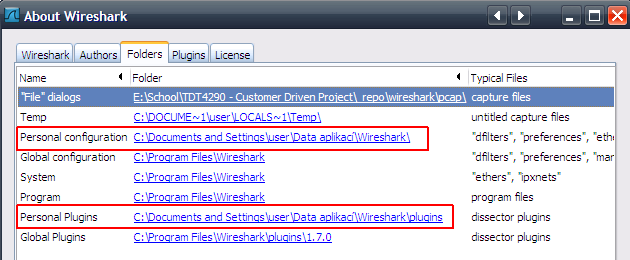
- Locate the Personal configuration and the Personal Plugins directories. To do this, start Wireshark and click on
Helpin the menubar and then onAbout Wireshark. This should bring up the About Wireshark dialog. From there, navigate to theFolderstab. Locate foldersPersonal configurationandPersonal Pluginsand note their paths (see below).
- on Linux/Unix system it may be
~/.wireshark/and~/.wireshark/plugins/
- on Windows it may be
C:\Users\*YourUserName*\AppData\Roaming\Wireshark\- and
C:\Users\*YourUserName*\AppData\Roaming\Wireshark\plugins\If the folders does not exist, create them.
- Copy CSjark generated file
luastructs.luainto thePersonal configurationfolder located in step 2.
Note
Location of CSjark generated files is given by -o command line argument. More in section Using CSjark.
Copy CSjark generated Lua dissector files into the
Personal Pluginsfolder located in step 2.Open the file
init.lualocated in thePersonal configurationfolder which you found in step 2. Insert the following code:dofile("luastructs.lua")
This ensures that theluastructs.luais loaded before all other Lua scripts.luastructs.luais a protocol that maps the id of the messages to the correct dissector, and calls them.
- Restart Wireshark.
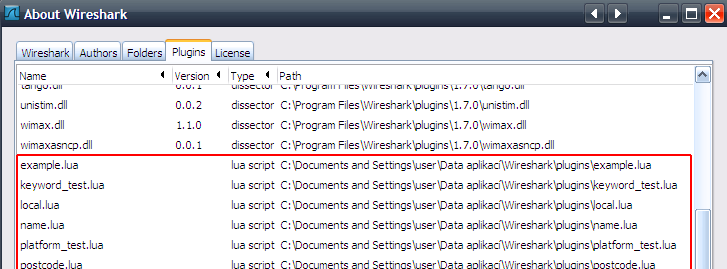
- To check that the scripts are loaded, navigate to
Help->About->Plugins. The scripts should now appear in the list as “lua script”.
To add further dissectors, only step 4, 5 and 6 needs to be repeated.
For further information on the Lua integration in Wireshark, please visit: Lua Support in Wireshark.